
Spectrum

Sep 2023
Self-Install

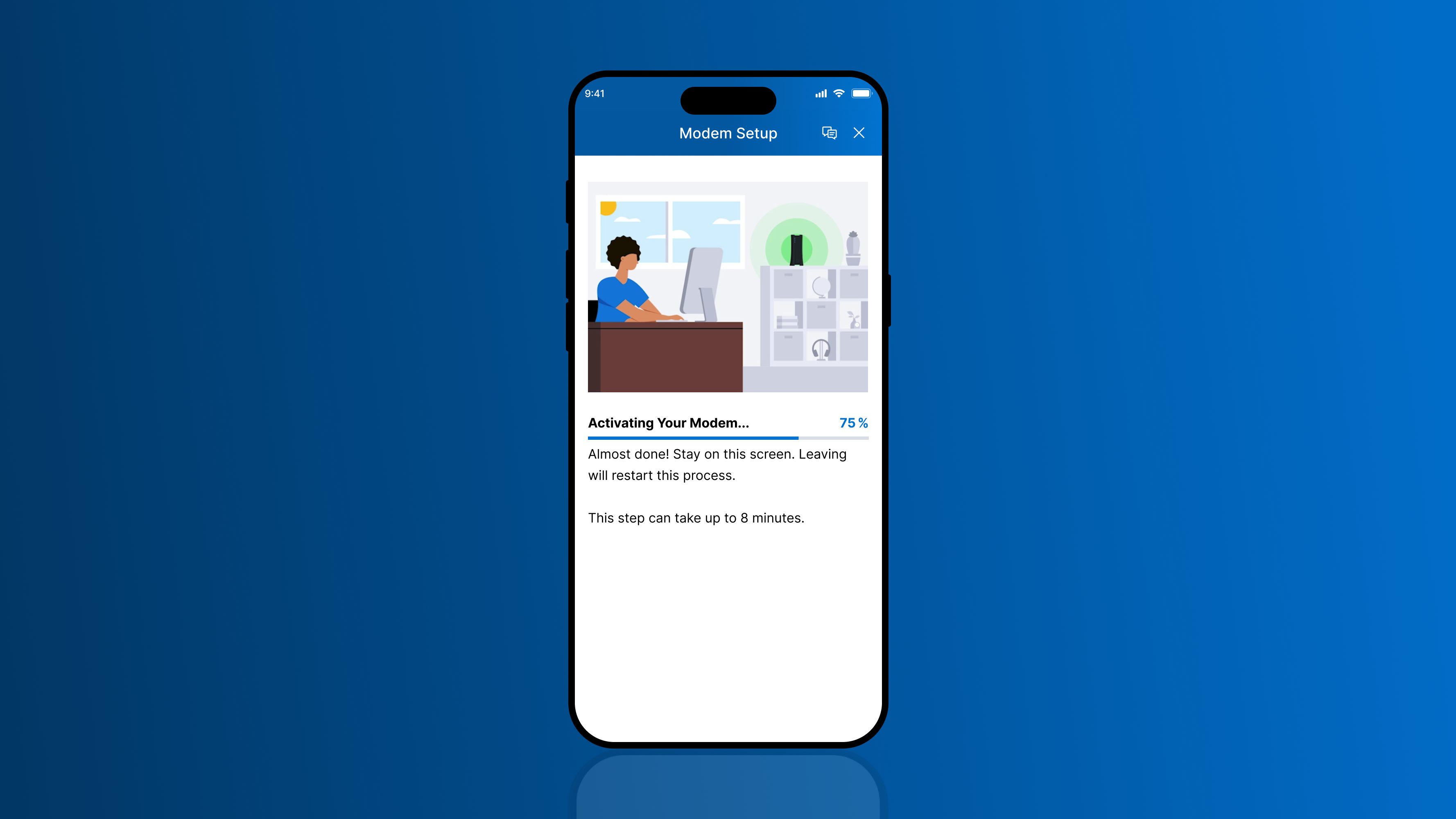
Customers who set up their Internet, TV, and Phone equipment on their own by using Spectrum's My Spectrum App faced issues with the existing experience that caused unnecessary failed activations, customer service calls, and technicians coming out to their property. As the lead product designer responsible for fixing this experience, I created a reliable and user-friendly experience that addressed the long wait times, lack of progress updates, and unclear equipment specific instructions, resulting in more customers getting their service up and running in a shorter time and business cost savings of $770,000 per year.
Project Impact
3.6%
Increase in task completion rate from 93% to 96.6%
5,500+
Fewer customer service calls per month
$770,000
In cost savings to the business per year
Jump to the Solution


The Problem
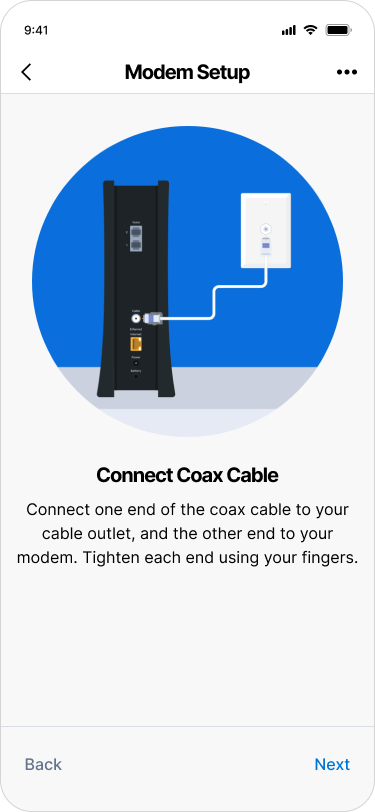
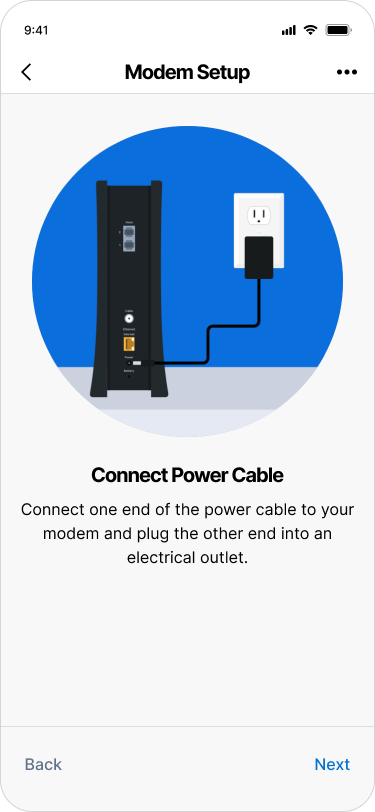
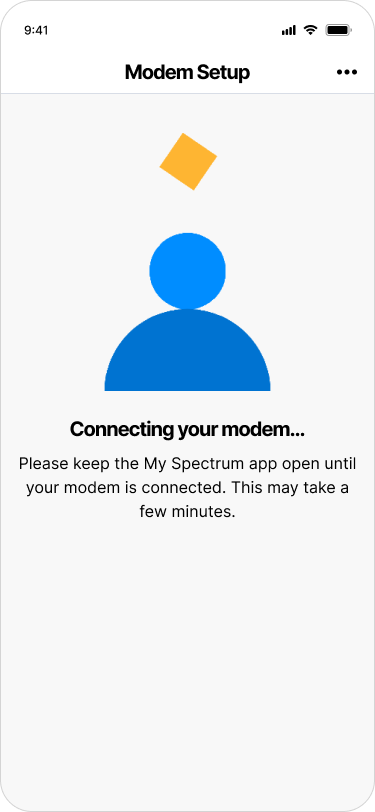
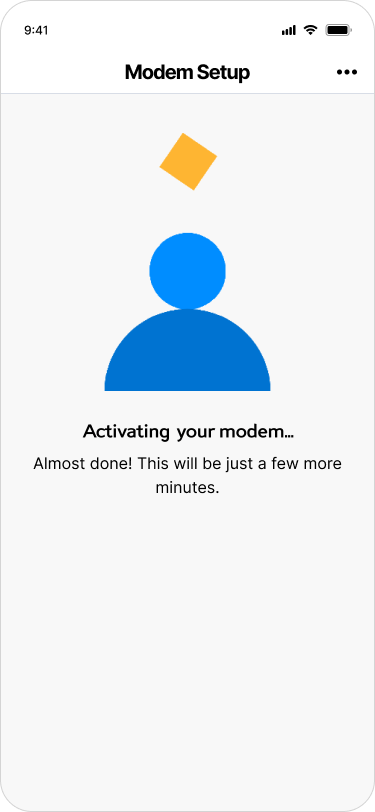
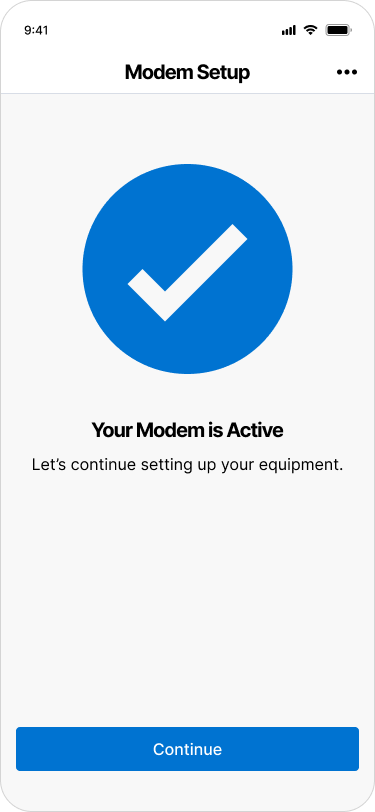
The legacy self-install experience shown below lacked:
- Clear wait time expectations
- No progress updates during potentially long waits (5-30 minutes)
- Proper warnings about the consequences of users leaving the process
- Equipment specific tutorial animations
Self-Install Experience Prior to the Redesign



The Design Approach
Analyzed Customer Feedback
27%
of customer complaints were related to the connection and activation screens where users are forced to wait for long periods.
(From 15,000 monthly customer surveys)
“The process with the app activating the modem and the router was not very intuitive because you're just sitting there forever not knowing if it's working or not.”
Other feedback indicated that the tutorial animations did not match the specific modem, router, or receiver the user had.
Analyzed Equipment Activation Times
Knowing the long wait times were problematic, I collaborated with the data & engineering teams to understand activation and connection times across different equipment types, allowing me to tailor the user experience more specifically for each device type the user is installing. We discovered the average time to be 5 minutes but successful outliers reaching 25-30 minutes, giving us a wide range of time to have to work around.
Internet Modem
WiFi
Router
TV
Receiver
50th
Percentile
75th
Percentile
Maximum
3.2 minutes
3.1 minutes
3.2 minutes
5 minutes
4.5 minutes
4 minutes
30 minutes
30 minutes
25 minutes
Conducted Remote User Testing
After gathering those insights, it was still important to get more qualitative feedback, so I facilitated virtual sessions with test participants to pinpoint frustrations and expectations, uncovering pain points in the legacy workflow.
Users reported:
- Feeling stuck due to the seemingly random bouncing animation
- Unaware of how much time they were going to have to wait
- That they would only wait up to 10 minutes before closing out of the app, without realizing that leaving would cancel the process entirely.
Researched Competitors
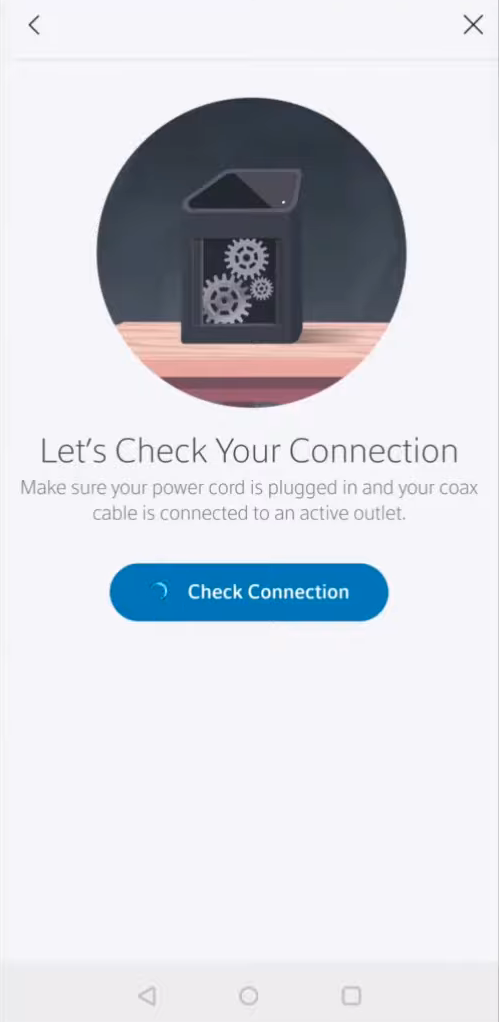
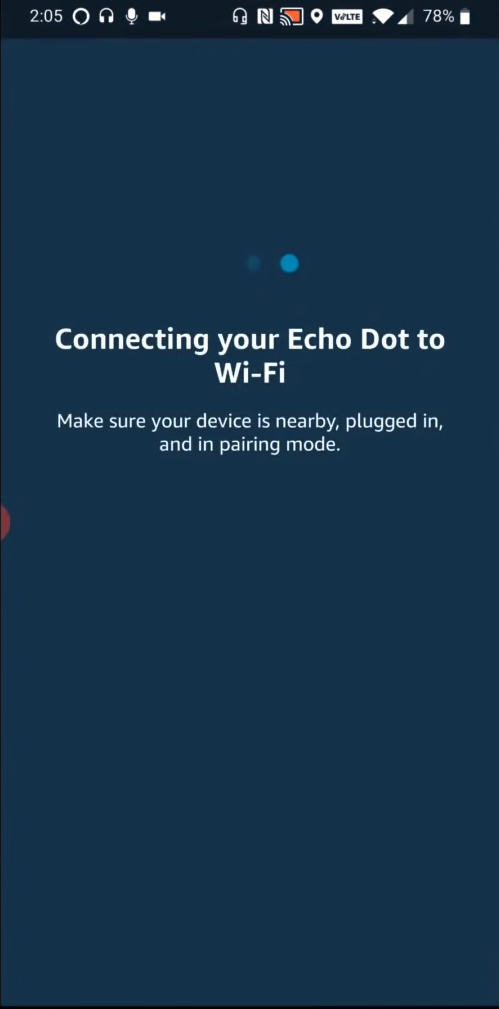
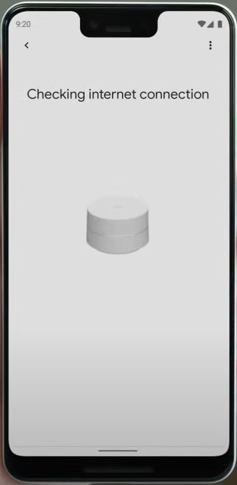
To move forward into the design stage with confidence, I benchmarked UX approaches used by leaders like Xfinity, Amazon, and Google Home, to gather best practices for equipment setup and connection.



Designed New Animations to Support Instruction & Storytelling
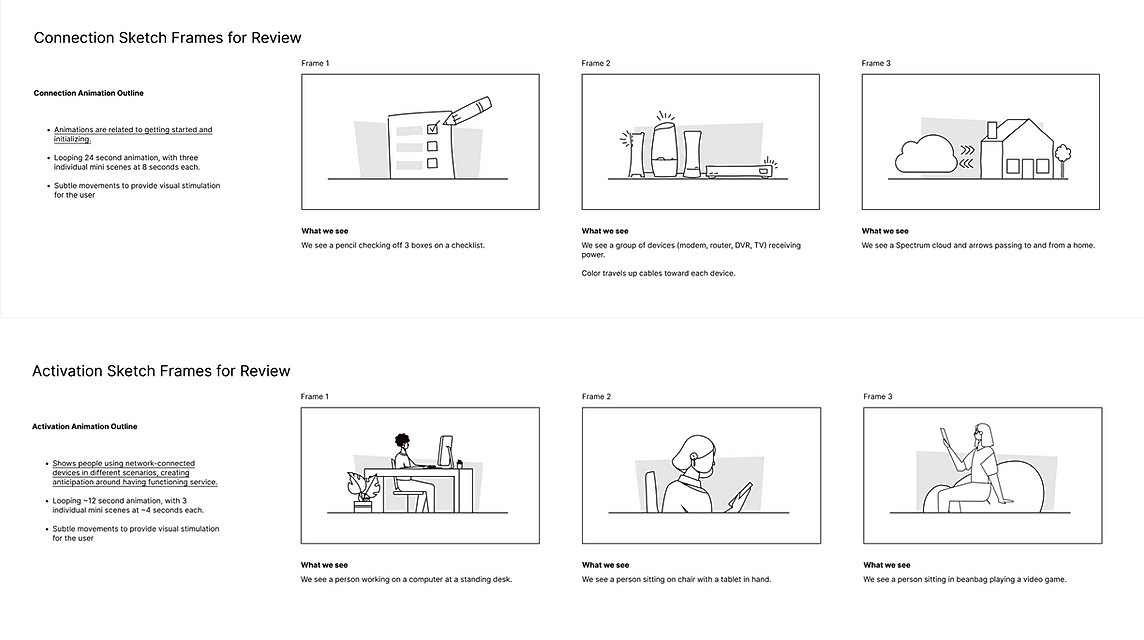
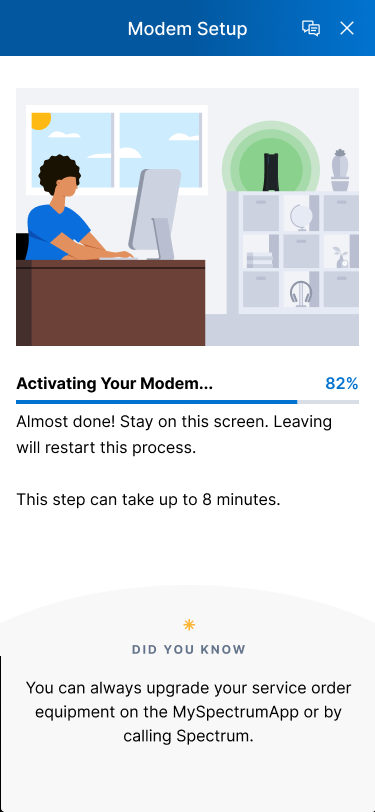
In collaboration with a visual designer, we created custom equipment-specific animations so that the app could instruct users properly with visuals and keep them engaged in the process.



Connection


Activation


Designed a New Progress Indicator to Convey Status & Progress
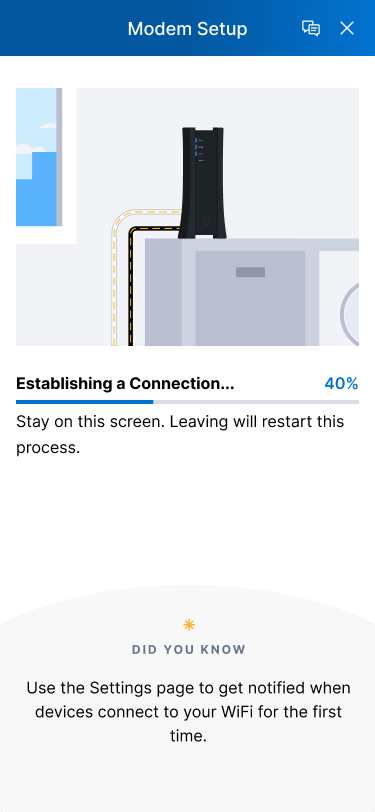
I designed a new progress bar component to visualize progress for users even when precise activation time estimates weren't possible. The progress bar moved at variable speeds, faster for the 95% of customers with normal wait times, and slower for the 5% experiencing longer delays, giving all users confidence that the process was working.
I then collaborated with the design systems team to create a solution that could be implemented at a systems level so other designers could consume the component for other use cases.
50
%
Stay on this screen. Leaving will restart this process.
Establishing a Connection...
Added Customer Support Chat
To fully round out the solution, I added the ability to chat with customer service directly from within the self-install experience to support the user in the event that they do get stuck.
Router Setup


Tested & Launched the Design
I was not able to direct user testing on this design approach prior to launching the feature due to time constraints. However, I did include the redesigned screens in a concurrent user testing study for another feature and received positive qualitative feedback on the new screens. The risk level was low, so we launched with confidence using only that feedback.
The Solution
A two-pronged product redesign that addressed both the emotional and informational aspects of the self-install experience. The new experience featured:
- Custom, equipment-specific animations to ensure the visuals matched the real world experience.
- A progress bar for visual feedback even when precise activation time estimates weren't possible.
- Ability to chat with customer support to support users who got stuck.
Project Impact
3.6%
Increase in task completion rate from 93% to 96.6%
5,500+
Fewer customer service calls per month
$770,000
In cost savings to the business per year

Next Steps
The connection and activation screens offer a valuable chance to educate customers about the exclusive features, promotions, and benefits available with Spectrum. Incorporating a rotating marketing banner in upcoming screen iterations will highlight these advantages, empowering customers with greater awareness and preparing them for their service interactions.
Work with Me


© 2026 Derek Warner. All rights reserved.
Spectrum
Sep 2023
Self-Install
Customers who set up their Internet, TV, and Phone equipment on their own by using Spectrum's My Spectrum App faced issues with the existing experience that caused unnecessary failed activations, customer service calls, and technicians coming out to their property. As the lead product designer responsible for fixing this experience, I created a reliable and user-friendly experience that addressed the long wait times, lack of progress updates, and unclear equipment specific instructions, resulting in more customers getting their service up and running in a shorter time and business cost savings of $770,000 per year.
Project Impact
3.6%
Increase in task completion rate from 93% to 96.6%
5,500+
Fewer customer service calls per month
$770,000
In cost savings to the business per year
Jump to the Solution

The Problem
The legacy self-install experience shown below lacked:
- Clear wait time expectations
- No progress updates during potentially long waits (5-30 minutes)
- Proper warnings about the consequences of users leaving the process
- Equipment specific tutorial animations
Self-Install Experience Prior to the Redesign

The Design Approach
Analyzed Customer Feedback
27%
of customer complaints were related to the connection and activation screens where users are forced to wait for long periods.
(From 15,000 monthly customer surveys)
“The process with the app activating the modem and the router was not very intuitive because you're just sitting there forever not knowing if it's working or not.”
Other feedback indicated that the tutorial animations did not match the specific modem, router, or receiver the user had.
Analyzed Equipment Activation Times
Knowing the long wait times were problematic, I collaborated with the data & engineering teams to understand activation and connection times across different equipment types, allowing me to tailor the user experience more specifically for each device type the user is installing. We discovered the average time to be 5 minutes but successful outliers reaching 25-30 minutes, giving us a wide range of time to have to work around.
Internet Modem
WiFi Router
TV Receiver
50th Percentile
75th Percentile
Maximum
3.2 minutes
3.1 minutes
3.2 minutes
5 minutes
4.5 minutes
4 minutes
30 minutes
30 minutes
25 minutes
Conducted Remote User Testing
After gathering those insights, it was still important to get more qualitative feedback, so I facilitated virtual sessions with test participants to pinpoint frustrations and expectations, uncovering pain points in the legacy workflow.
Users reported:
- Feeling stuck due to the seemingly random bouncing animation
- Unaware of how much time they were going to have to wait
- That they would only wait up to 10 minutes before closing out of the app, without realizing that leaving would cancel the process entirely.
Researched Competitors
To move forward into the design stage with confidence, I benchmarked UX approaches used by leaders like Xfinity, Amazon, and Google Home, to gather best practices for equipment setup and connection.
Designed New Animations to Support Instruction & Storytelling
In collaboration with a visual designer, we created custom equipment-specific animations so that the app could instruct users properly with visuals and keep them engaged in the process.


Modem
Router
Receiver
Connection

Activation

Designed a New Progress Indicator to Convey Status & Progress
I designed a new progress bar component to visualize progress for users even when precise activation time estimates weren't possible. The progress bar moved at variable speeds, faster for the 95% of customers with normal wait times, and slower for the 5% experiencing longer delays, giving all users confidence that the process was working.
I then collaborated with the design systems team to create a solution that could be implemented at a systems level so other designers could consume the component for other use cases.
50
%
Stay on this screen. Leaving will restart this process.
Establishing a Connection...
Added Customer Support Chat
To fully round out the solution, I added the ability to chat with customer service directly from within the self-install experience to support the user in the event that they do get stuck.
Router Setup
Tested & Launched the Design
I was not able to direct user testing on this design approach prior to launching the feature due to time constraints. However, I did include the redesigned screens in a concurrent user testing study for another feature and received positive qualitative feedback on the new screens. The risk level was low, so we launched with confidence using only that feedback.
The Solution
A two-pronged product redesign that addressed both the emotional and informational aspects of the self-install experience. The new experience featured:
- Custom, equipment-specific animations to ensure the visuals matched the real world experience.
- A progress bar for visual feedback even when precise activation time estimates weren't possible.
- Ability to chat with customer support to support users who got stuck.
Project Impact
3.6%
Increase in task completion rate from 93% to 96.6%
5,500+
Fewer customer service calls per month
$770,000
In cost savings to the business per year

Next Steps
The connection and activation screens offer a valuable chance to educate customers about the exclusive features, promotions, and benefits available with Spectrum. Incorporating a rotating marketing banner in upcoming screen iterations will highlight these advantages, empowering customers with greater awareness and preparing them for their service interactions.
Work with Me
© 2026 Derek Warner. All rights reserved.
Spectrum
Sep 2023
Self-Install
Customers who set up their Internet, TV, and Phone equipment on their own by using Spectrum's My Spectrum App faced issues with the existing experience that caused unnecessary failed activations, customer service calls, and technicians coming out to their property. As the lead product designer responsible for fixing this experience, I created a reliable and user-friendly experience that addressed the long wait times, lack of progress updates, and unclear equipment specific instructions, resulting in more customers getting their service up and running in a shorter time and business cost savings of $770,000 per year.
Project Impact
3.6%
Increase in task completion rate from 93% to 96.6%
5,500+
Fewer customer service calls per month
$770,000
In cost savings to the business per year
Jump to the Solution

The Problem
The legacy self-install experience shown below lacked:
- Clear wait time expectations
- No progress updates during potentially long waits (5-30 minutes)
- Proper warnings about the consequences of users leaving the process
- Equipment specific tutorial animations
Self-Install Experience Prior to the Redesign

The Design Approach
Analyzed Customer Feedback
27%
of customer complaints were related to the connection and activation screens where users are forced to wait for long periods.
(From 15,000 monthly customer surveys)
“The process with the app activating the modem and the router was not very intuitive because you're just sitting there forever not knowing if it's working or not.”
Other feedback indicated that the tutorial animations did not match the specific modem, router, or receiver the user had.
Analyzed Equipment Activation Times
Knowing the long wait times were problematic, I collaborated with the data & engineering teams to understand activation and connection times across different equipment types, allowing me to tailor the user experience more specifically for each device type the user is installing. We discovered the average time to be 5 minutes but successful outliers reaching 25-30 minutes, giving us a wide range of time to have to work around.
Internet Modem
WiFi Router
TV Receiver
50th Percentile
75th Percentile
Maximum
3.2 minutes
3.1 minutes
3.2 minutes
5 minutes
4.5 minutes
4 minutes
30 minutes
30 minutes
25 minutes
Conducted Remote User Testing
After gathering those insights, it was still important to get more qualitative feedback, so I facilitated virtual sessions with test participants to pinpoint frustrations and expectations, uncovering pain points in the legacy workflow.
Users reported:
- Feeling stuck due to the seemingly random bouncing animation
- Unaware of how much time they were going to have to wait
- That they would only wait up to 10 minutes before closing out of the app, without realizing that leaving would cancel the process entirely.
Researched Competitors
To move forward into the design stage with confidence, I benchmarked UX approaches used by leaders like Xfinity, Amazon, and Google Home, to gather best practices for equipment setup and connection.
Designed New Animations to Support Instruction & Storytelling
In collaboration with a visual designer, we created custom equipment-specific animations so that the app could instruct users properly with visuals and keep them engaged in the process.

Modem
Router
Receiver
Connection
Activation

Designed a New Progress Indicator to Convey Status & Progress
I designed a new progress bar component to visualize progress for users even when precise activation time estimates weren't possible. The progress bar moved at variable speeds, faster for the 95% of customers with normal wait times, and slower for the 5% experiencing longer delays, giving all users confidence that the process was working.
I then collaborated with the design systems team to create a solution that could be implemented at a systems level so other designers could consume the component for other use cases.
50
%
Stay on this screen. Leaving will restart this process.
Establishing a Connection...
Added Customer Support Chat
To fully round out the solution, I added the ability to chat with customer service directly from within the self-install experience to support the user in the event that they do get stuck.
Router Setup
Tested & Launched the Design
I was not able to direct user testing on this design approach prior to launching the feature due to time constraints. However, I did include the redesigned screens in a concurrent user testing study for another feature and received positive qualitative feedback on the new screens. The risk level was low, so we launched with confidence using only that feedback.
The Solution
A two-pronged product redesign that addressed both the emotional and informational aspects of the self-install experience. The new experience featured:
- Custom, equipment-specific animations to ensure the visuals matched the real world experience.
- A progress bar for visual feedback even when precise activation time estimates weren't possible.
- Ability to chat with customer support to support users who got stuck.
Project Impact
3.6%
Increase in task completion rate from 93% to 96.6%
5,500+
Fewer customer service calls per month
$770,000
In cost savings to the business per year
Next Steps
The connection and activation screens offer a valuable chance to educate customers about the exclusive features, promotions, and benefits available with Spectrum. Incorporating a rotating marketing banner in upcoming screen iterations will highlight these advantages, empowering customers with greater awareness and preparing them for their service interactions.
Work with Me
© 2026 Derek Warner. All rights reserved.