Samsung SmartThings

Jan 2026
SmartThings Console

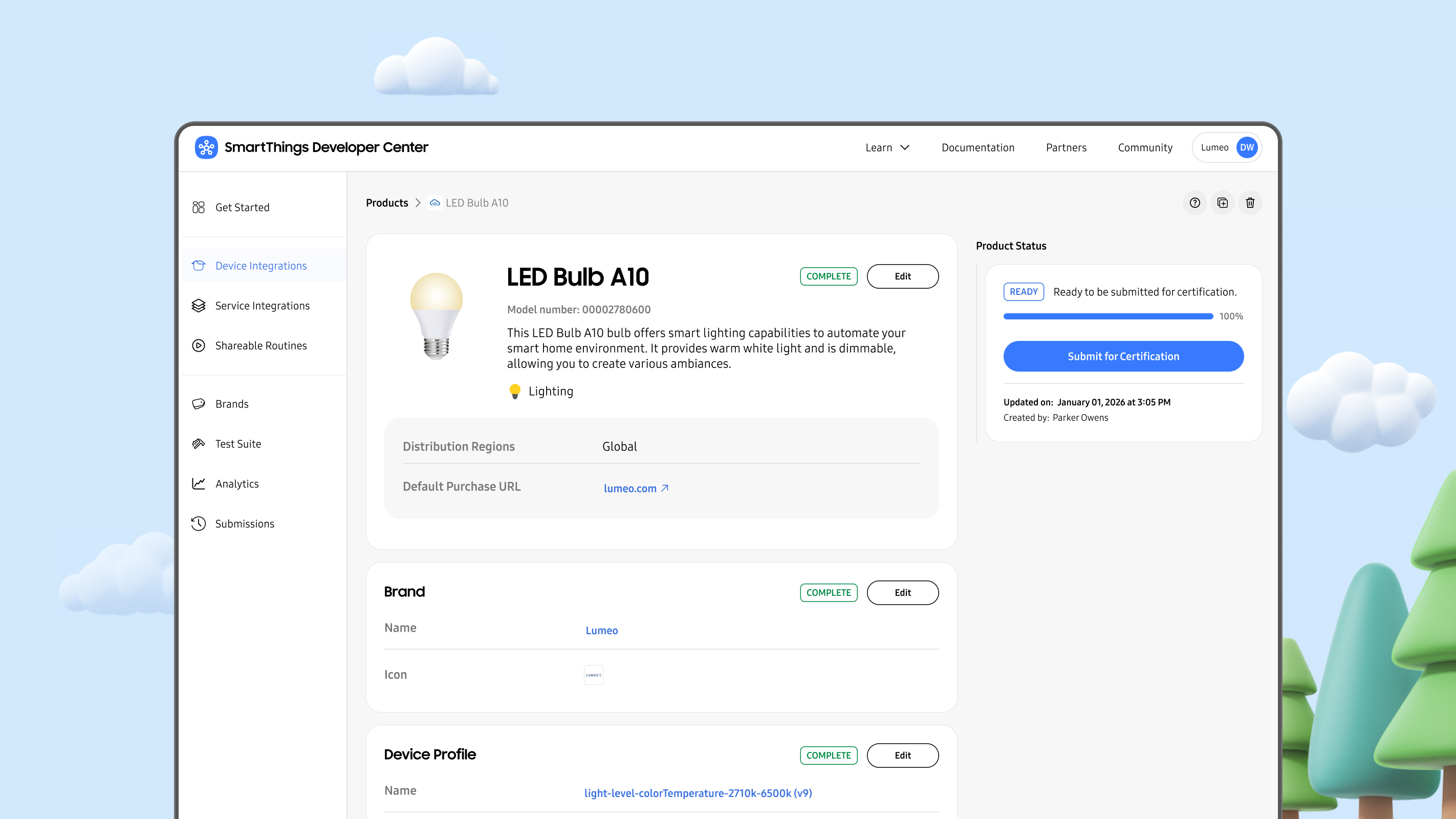
SmartThings is Samsung’s smart home platform that allows users to connect and automate devices from hundreds of different companies in a single app. Companies (also known as SmartThings partners) who wanted to integrate with the SmartThings ecosystem were hindered by a fragmented experience, forced to navigate a maze of disconnected tools and documentation. This resulted in a long and difficult integration path with a heavy reliance on support from SmartThings Partner Success Managers to achieve device certification and get on the platform. Additionally, being fragmented caused SmartThings difficulty in scaling their partner platform. As lead product designer, I designed the SmartThings Console to create a unified experience that streamlined the partner journey into a single, cohesive path, accelerating device certification and achieving platform scalability.
Project Impact

Accelerated Growth
Reduced partner time-to-certification, getting more devices onto SmartThings faster.

Partner Autonomy
Improved partner self-serve rate, empowering partners to succeed independently.

Operational Efficiency
Reduced platform maintenance by consolidating legacy frontends and significantly cutting long-term engineering costs.

Platform Scalability
Built a framework that supports new integration types and features, attracting a broader range of partners and unlocking new market opportunities.
Jump to the Solution


The Challenge
SmartThings Developer Center had an architectural problem that manifested itself in the user experience, resulting in problems for users.
The Friction: Users had no clear starting point, had to jump between multiple tools and documentation, and often still needed support from SmartThings to achieve a successful integration.
The Business Risk: The fragmented experience came with high costs and could not easily scale to support new integration types and features like API Access Apps, Shareable Routines, or Advanced Analytics.
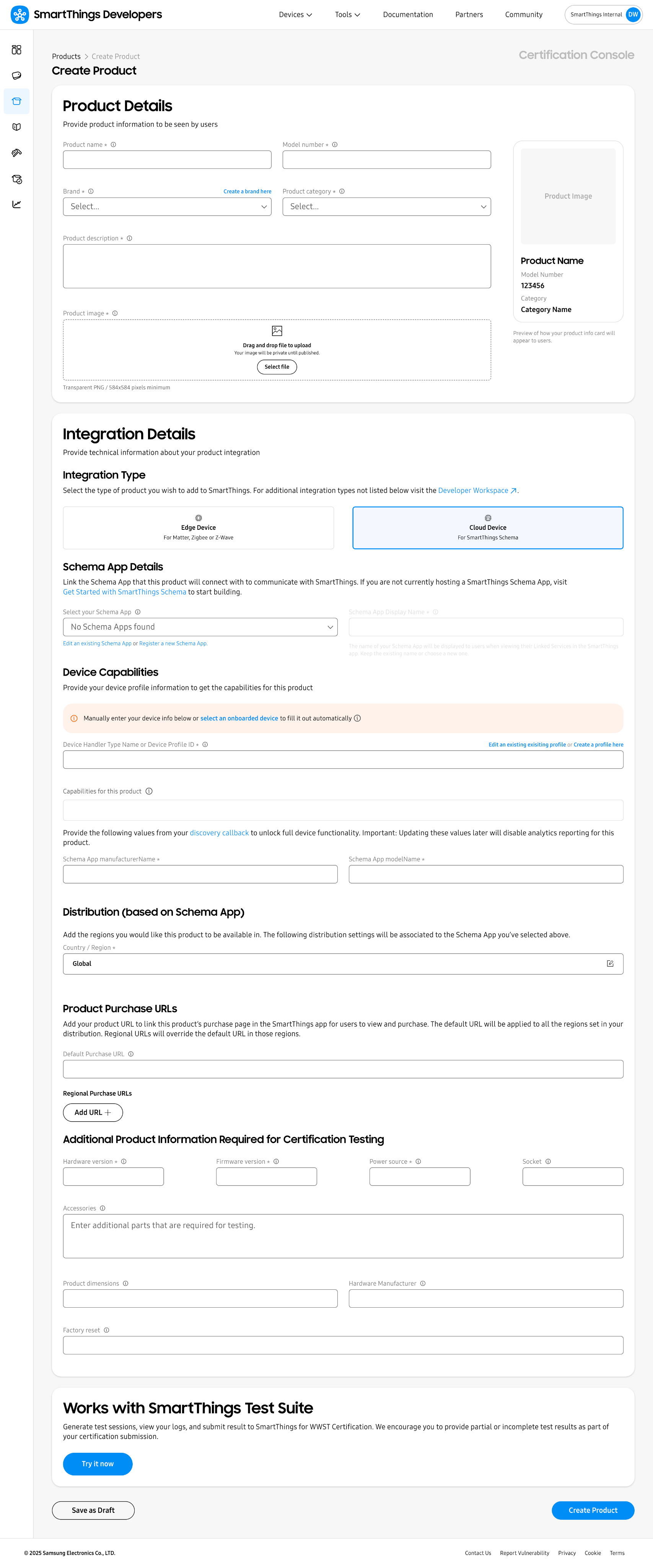
The legacy experience featured many tools to choose from and no clear starting point.
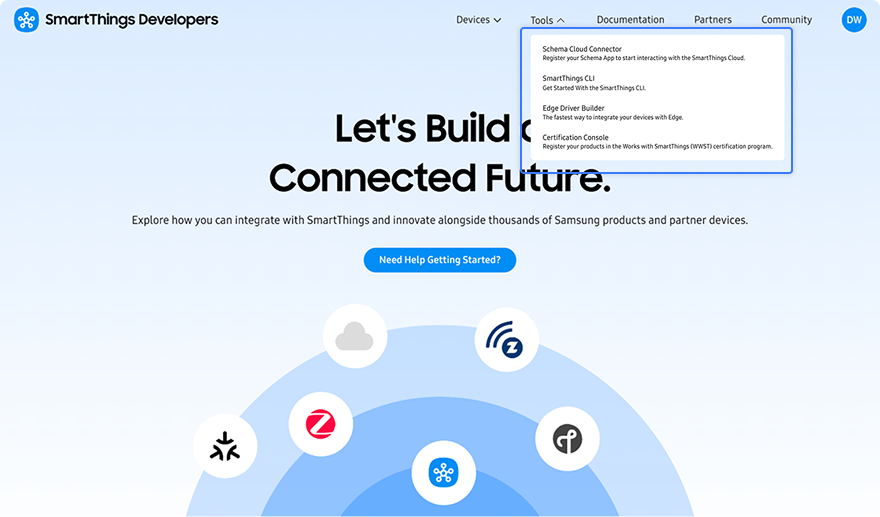
The forms were cognitively heavy and pushed the user out to other various tools that did not connect back. Menus were confusing and lacked structure. Users had no sense of progress.

The Process
Performed Discovery & Analysis
To determine the most effective path forward, I conducted a focused discovery process:
Stakeholder Interviews: To gain a deeper understanding of partner needs, I interviewed Partner Success Managers - the team responsible for supporting partners day to day. Their close working relationships provided firsthand insight into partner challenges, workflows, and pain points.
Competitive Benchmarking: I researched industry leaders, including Google Home Developer Console and Homey, to identify best practices for multi-pathway device setups.
Metric Analysis: I analyzed key performance data to pinpoint friction throughout the legacy process, including drop-off points, time to certification, task completion rates, and support request frequency. These insights helped identify where partners were encountering obstacles and where the experience needed improvement.
Rethought the Information Architecture & User Flows
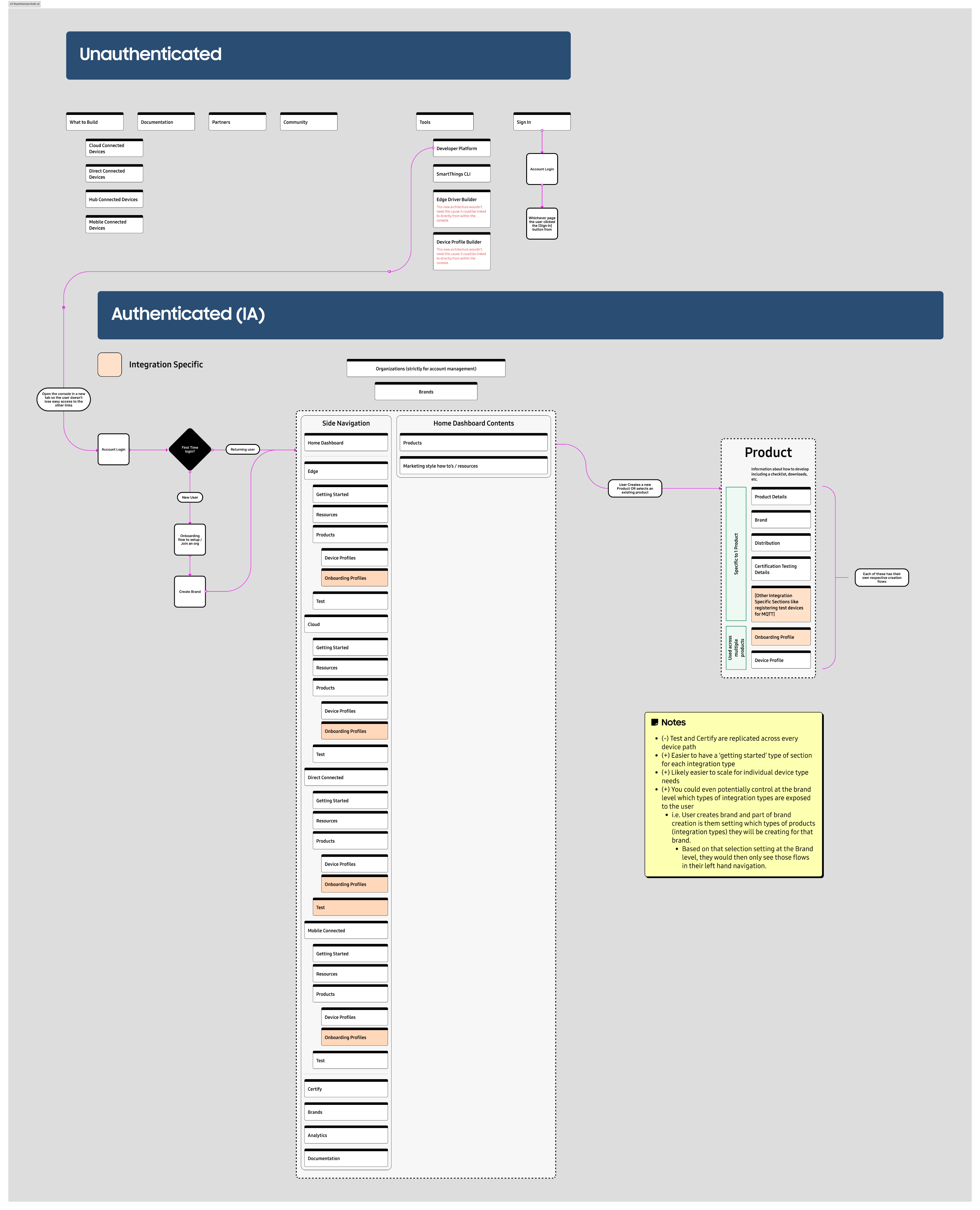
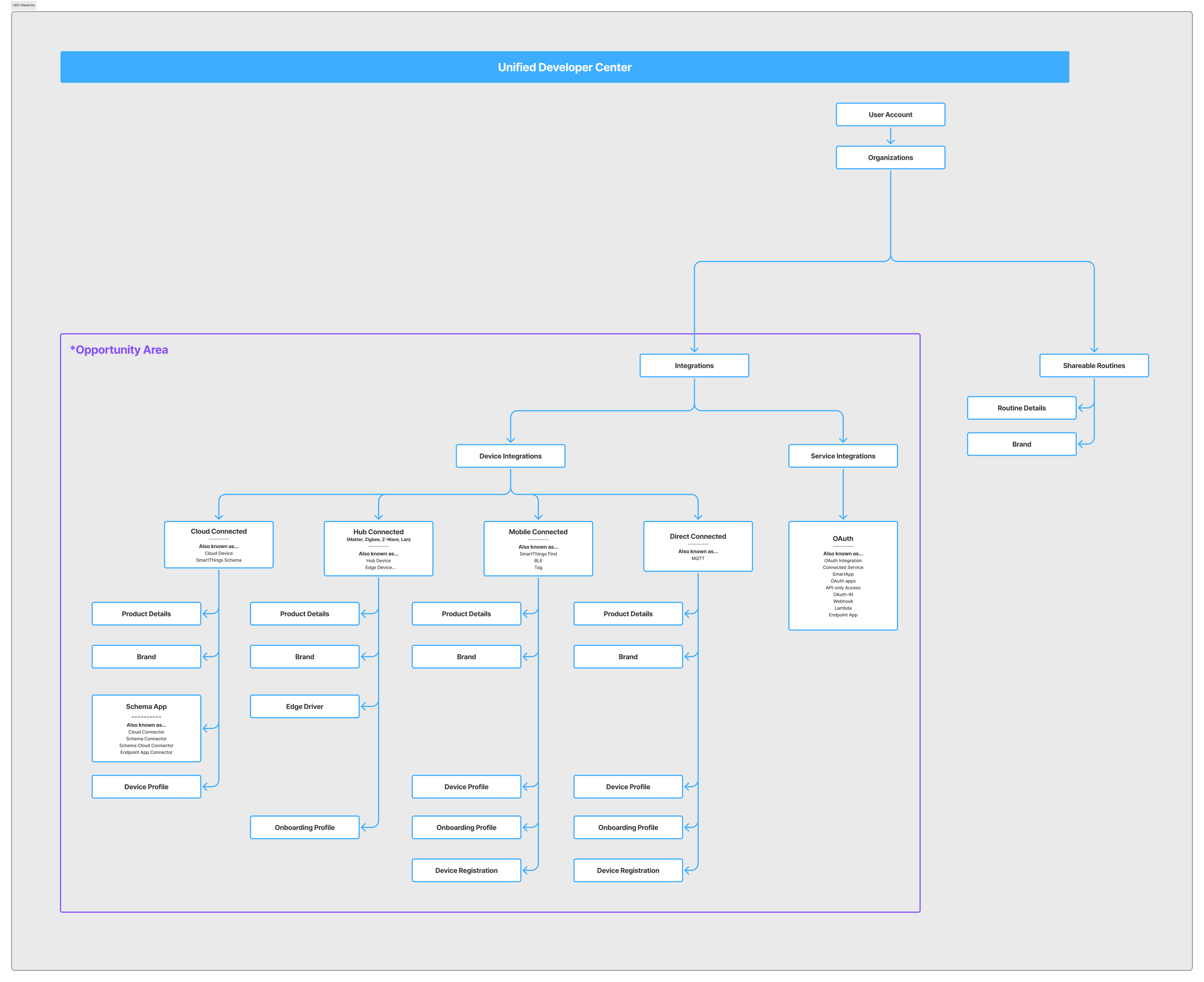
With a solid understanding of the problem space, I conducted an information architecture exercise to deconstruct the experience into its core components and reorganize them into a more logical, scalable structure.
From there, I mapped unique user flows for each persona, including Matter device manufacturers, cloud-to-cloud device manufacturers, product managers, developers, and more. This process clarified which tools were essential at each stage of the journey and informed a new UX framework.
This work established the foundation for a modular, persona-based experience designed to reduce cognitive load, streamline workflows, and guide partners efficiently through certification.
Wireframing into High Fidelity
I started design with wireframes for cross-functional review with Partner Success, Engineering, and Product to validate feasibility, align on business priorities, and confirm user impact.
The solution leveraged a modular workflow to simplify complexity, breaking large tasks into structured steps and guiding users through a streamlined, end-to-end experience.
Once aligned internally, I converted the wireframes into a higher fidelity.
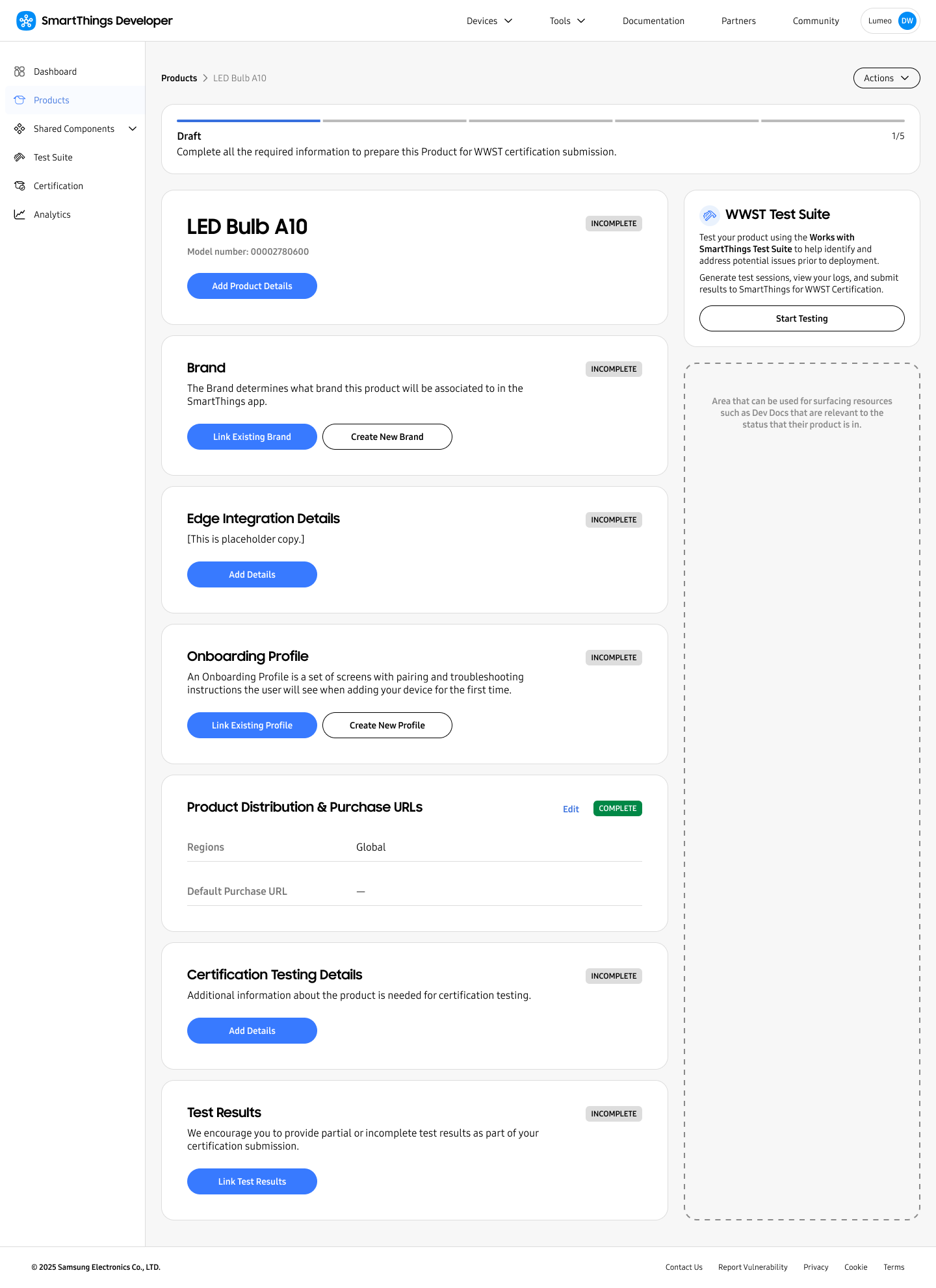
Preview of the first high fidelity concept
Conducted User Research on the Design Concept
I validated the high-fidelity concepts through usability testing with SmartThings partners. Feedback was highly positive, with participants expressing strong confidence in the streamlined workflow and overall ease of the experience.
One participant quoted:
“You just made it too intuitive.”
Other feedback included:
Feedback:
Introduction of a linear workflow, progress, status, and clear next actions makes the new experience more intuitive than the legacy one but the UI felt bulky and click heavy for the advanced users on their team.
Takeaway:
Maintain the modular, workflow style UX while minimizing the number of clicks required to get from A to Z and reduce the size of UI elements like the status bar so they do not get in the way of executing on tasks.
Feedback:
Features across various smart home platforms are often named different things and can be confusing. Creative, branded names often make features more difficult to understand what they are.
Takeaway:
Create easy to understand feature terminology that will make sense to primary users, is consistent across all tools and documentation, and does not interfere with any legacy naming of API’s, documentation, etc.
Refined the Designs
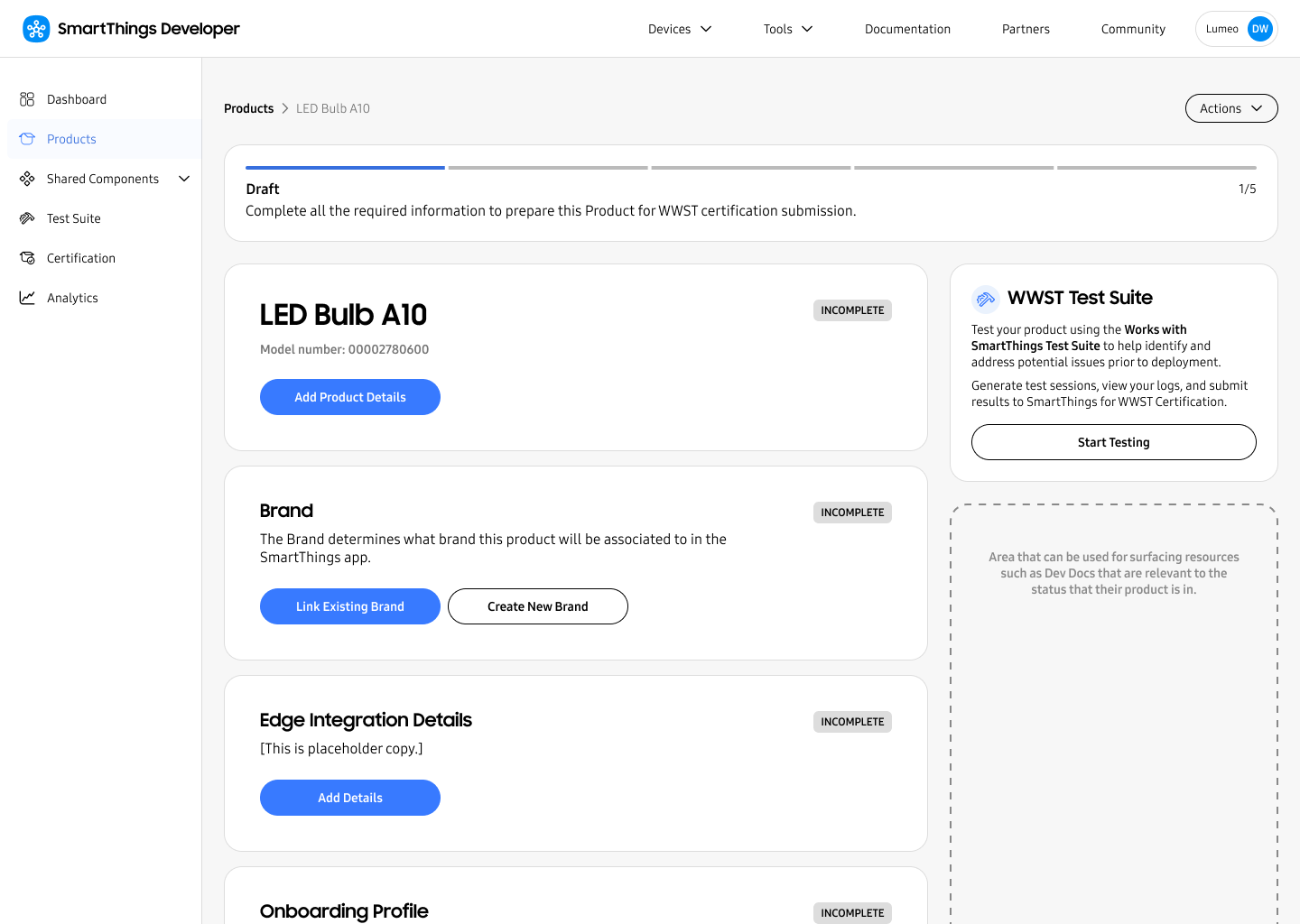
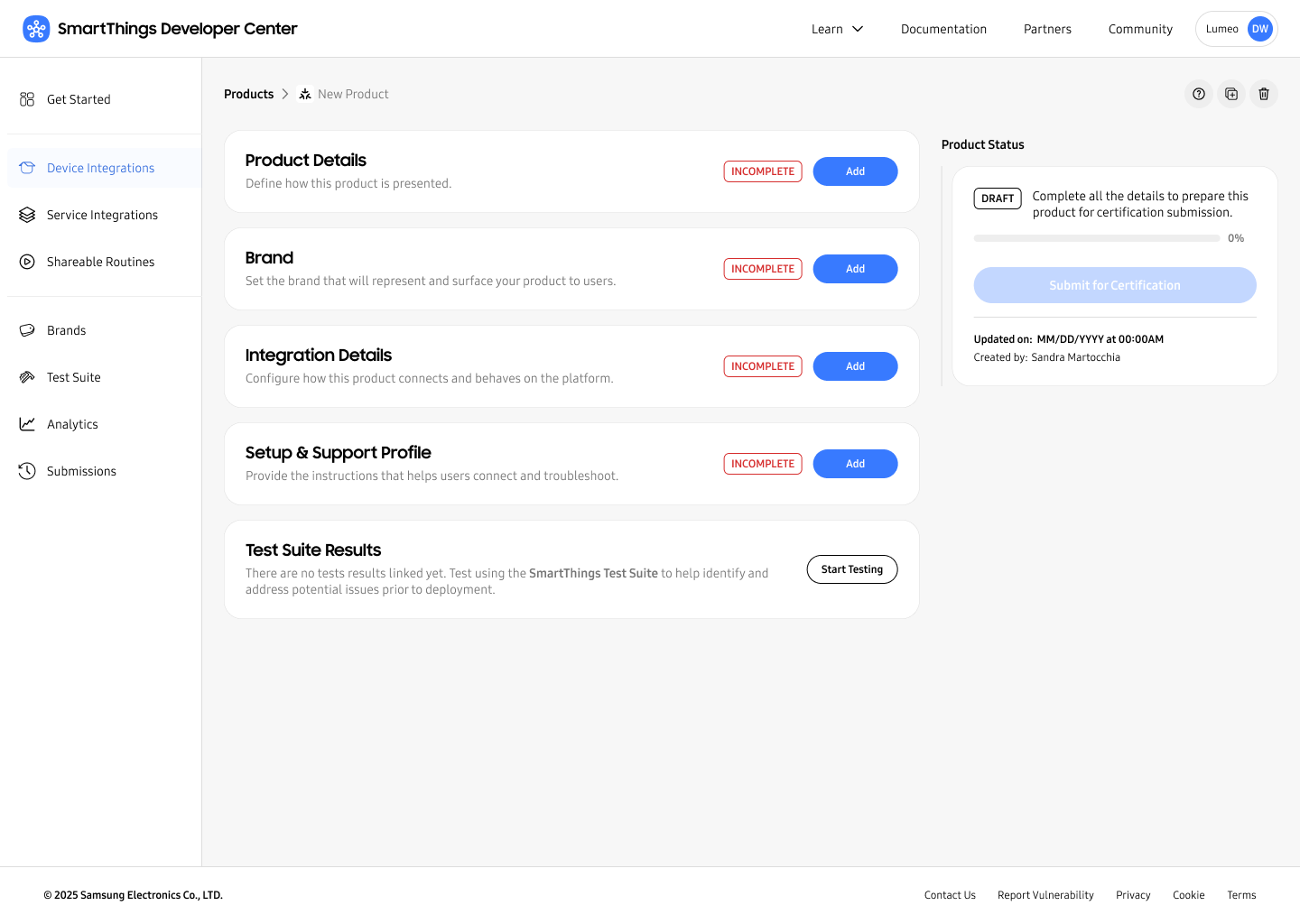
Guided by user insights and stakeholder input, I led three rounds of iteration to optimize the experience. This work streamlined the end-to-end workflow, improved information architecture, reduced UI complexity, and clarified feature terminology to better match user mental models.
First Draft for User Testing
Iteration 2
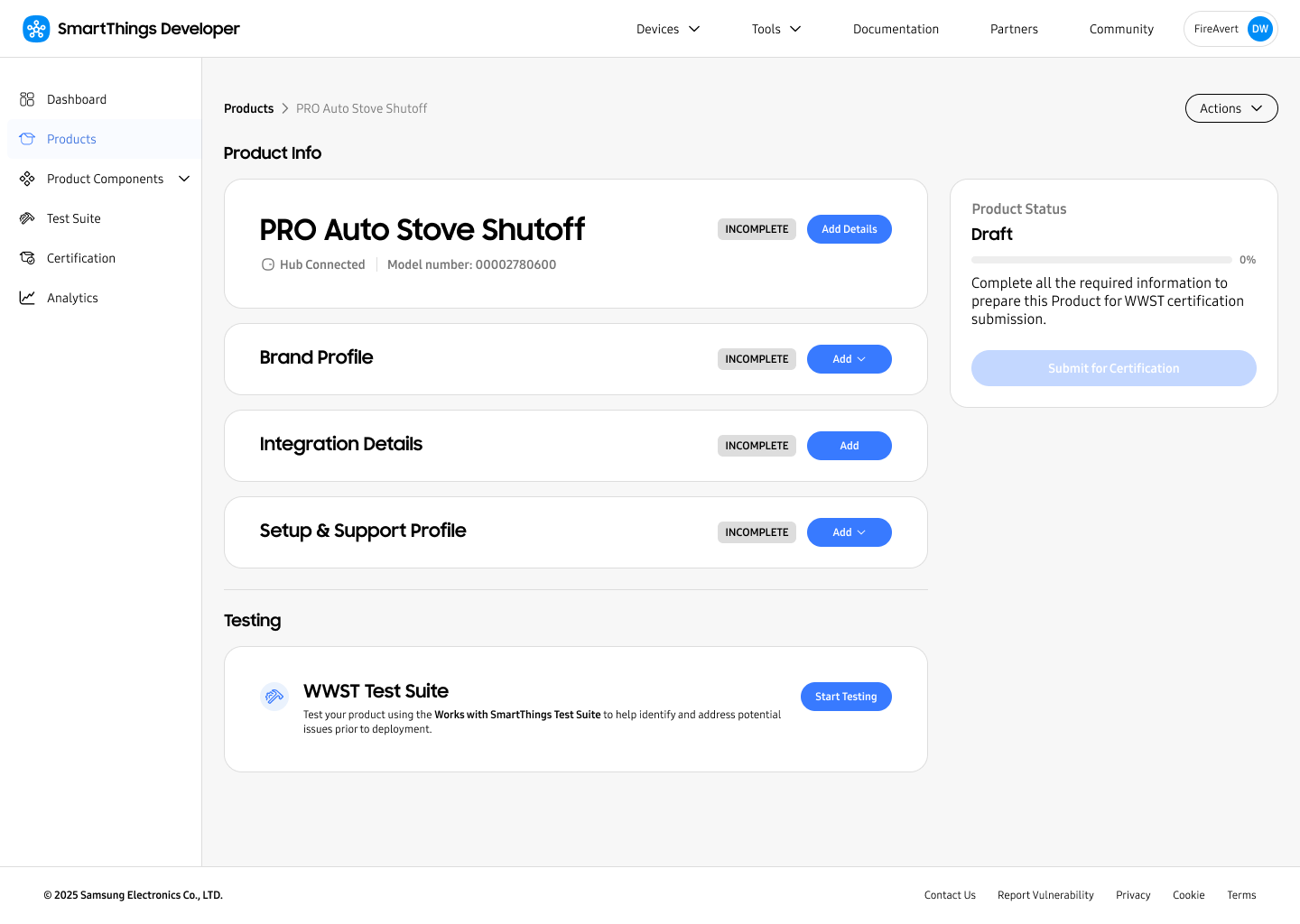
Iteration 3
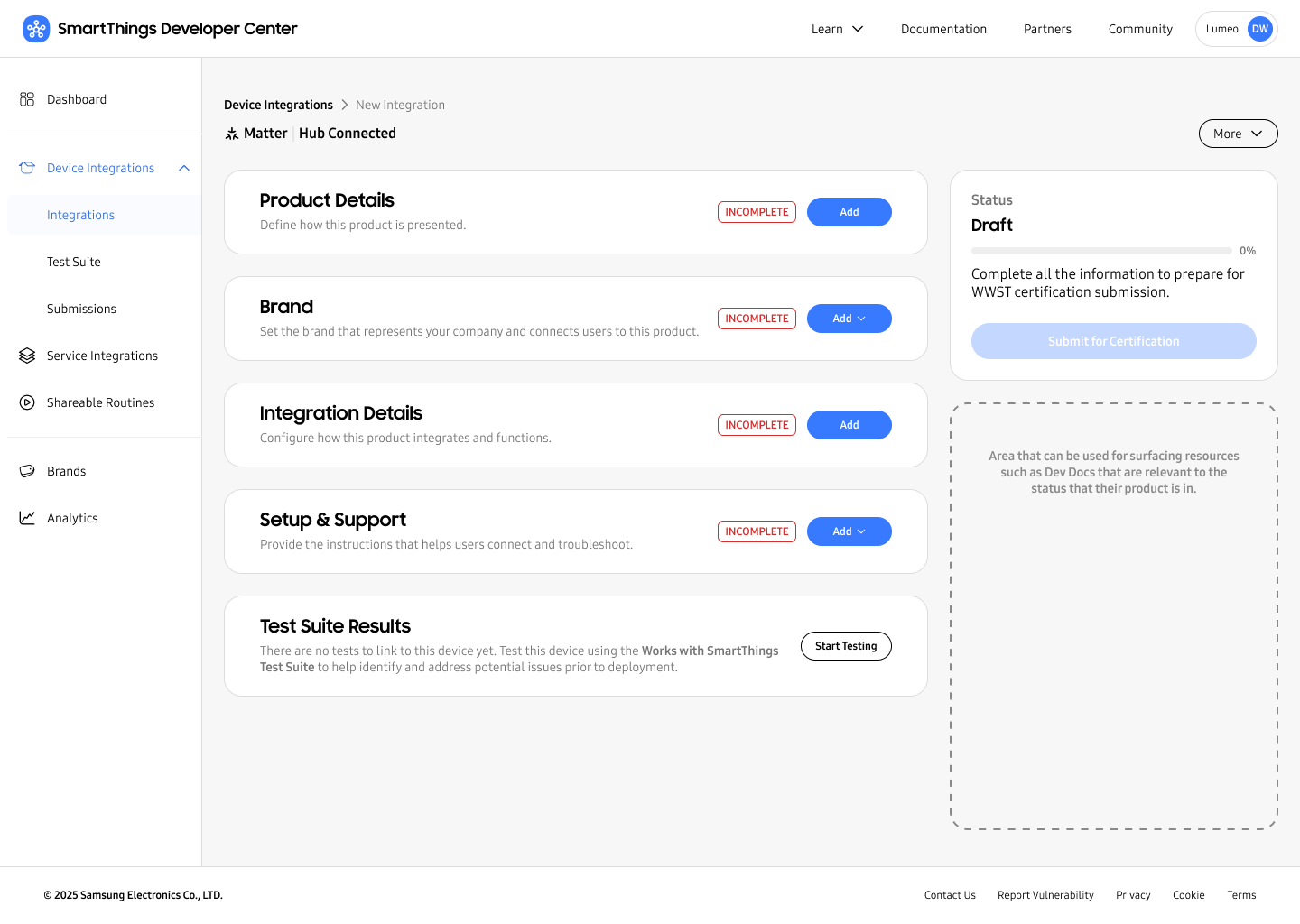
MVP

The Solution
The result was a design where fragmented SmartThings partner tools became interconnected as part of a single, unified console in the SmartThings Developer Center called SmartThings Console.
SmartThings Console Features
- Contextual workflows that adapt to each partner’s specific use case. For example, cloud-to-cloud device manufacturers see only cloud-to-cloud tools, while Matter manufacturers see only Matter specific tools.
- Task segmentation that breaks complex processes into manageable steps, reducing cognitive load.
- Clearer feature naming aligned with user language and mental models.
- Contextual guidance and documentation embedded directly within relative steps of workflows.
- Progress indicators that provide visibility into completion status and remaining work.
- A scalable information architecture designed to support the platform’s continued growth and evolving business needs.
Project Impact
Accelerated Growth
Reduced partner time-to-certification, getting more devices onto SmartThings faster.
Partner Autonomy
Improved partner self-serve rate, empowering partners to succeed independently.
Operational Efficiency
Reduced platform maintenance by consolidating legacy frontends and significantly cutting long-term engineering costs.
Platform Scalability
Built a framework that supports new integration types and features, attracting a broader range of partners and unlocking new market opportunities.


derekrwarner@gmail.com


© 2026 Derek Warner. All rights reserved.
Return Home
Samsung SmartThings
Jan 2026
SmartThings Console

SmartThings is Samsung’s smart home platform that allows users to connect and automate devices from hundreds of different companies in a single app. Companies (also known as SmartThings partners) who wanted to integrate with the SmartThings ecosystem were hindered by a fragmented experience, forced to navigate a maze of disconnected tools and documentation. This resulted in a long and difficult integration path with a heavy reliance on support from SmartThings Partner Success Managers to achieve device certification and get on the platform. Additionally, being fragmented caused SmartThings difficulty in scaling their partner platform. As lead product designer, I designed the SmartThings Console to create a unified experience that streamlined the partner journey into a single, cohesive path, accelerating device certification and achieving platform scalability.
Project Impact
Accelerated Growth
Reduced partner time-to-certification, getting more devices onto SmartThings faster.
Partner Autonomy
Improved partner self-serve rate, empowering partners to succeed independently.
Operational Efficiency
Reduced platform maintenance by consolidating legacy frontends and significantly cutting long-term engineering costs.
Platform Scalability
Built a framework that supports new integration types and features, attracting a broader range of partners and unlocking new market opportunities.
Jump to the Solution

The Challenge
SmartThings Developer Center had an architectural problem that manifested itself in the user experience, resulting in problems for users.
The Friction: Users had no clear starting point, had to jump between multiple tools and documentation, and often still needed support from SmartThings to achieve a successful integration.
The Business Risk: The fragmented experience came with high costs and could not easily scale to support new integration types and features like API Access Apps, Shareable Routines, or Advanced Analytics.
The legacy experience featured many tools to choose from and no clear starting point.
The forms were cognitively heavy and pushed the user out to other various tools that did not connect back. Menus were confusing and lacked structure. Users had no sense of progress.

The Process
Performed Discovery & Analysis
To determine the most effective path forward, I conducted a focused discovery process:
Stakeholder Interviews: To gain a deeper understanding of partner needs, I interviewed Partner Success Managers - the team responsible for supporting partners day to day. Their close working relationships provided firsthand insight into partner challenges, workflows, and pain points.
Competitive Benchmarking: I researched industry leaders, including Google Home Developer Console and Homey, to identify best practices for multi-pathway device setups.
Metric Analysis: I analyzed key performance data to pinpoint friction throughout the legacy process, including drop-off points, time to certification, task completion rates, and support request frequency. These insights helped identify where partners were encountering obstacles and where the experience needed improvement.
Rethought the Information Architecture & User Flows
With a solid understanding of the problem space, I conducted an information architecture exercise to deconstruct the experience into its core components and reorganize them into a more logical, scalable structure.
From there, I mapped unique user flows for each persona, including Matter device manufacturers, cloud-to-cloud device manufacturers, product managers, developers, and more. This process clarified which tools were essential at each stage of the journey and informed a new UX framework.
This work established the foundation for a modular, persona-based experience designed to reduce cognitive load, streamline workflows, and guide partners efficiently through certification.
Wireframing into High Fidelity
I started design with wireframes for cross-functional review with Partner Success, Engineering, and Product to validate feasibility, align on business priorities, and confirm user impact.
The solution leveraged a modular workflow to simplify complexity, breaking large tasks into structured steps and guiding users through a streamlined, end-to-end experience.
Once aligned internally, I converted the wireframes into a higher fidelity.
Preview of the first high fidelity concept
Conducted User Research on the Design Concept
I validated the high-fidelity concepts through usability testing with SmartThings partners. Feedback was highly positive, with participants expressing strong confidence in the streamlined workflow and overall ease of the experience.
One participant quoted:
“You just made it too intuitive.”
Other feedback included:
Feedback:
Introduction of a linear workflow, progress, status, and clear next actions makes the new experience more intuitive than the legacy one but the UI felt bulky and click heavy for the advanced users on their team.
Takeaway:
Maintain the modular, workflow style UX while minimizing the number of clicks required to get from A to Z and reduce the size of UI elements like the status bar so they do not get in the way of executing on tasks.
Feedback:
Features across various smart home platforms are often named different things and can be confusing. Creative, branded names often make features more difficult to understand what they are.
Takeaway:
Create easy to understand feature terminology that will make sense to primary users, is consistent across all tools and documentation, and does not interfere with any legacy naming of API’s, documentation, etc.
Refined the Designs
Guided by user insights and stakeholder input, I led three rounds of iteration to optimize the experience. This work streamlined the end-to-end workflow, improved information architecture, reduced UI complexity, and clarified feature terminology to better match user mental models.
First Draft for User Testing
Iteration 2
Iteration 3
MVP
The Solution
The result was a design where fragmented SmartThings partner tools became interconnected as part of a single, unified console in the SmartThings Developer Center called SmartThings Console.
SmartThings Console Features
- Contextual workflows that adapt to each partner’s specific use case. For example, cloud-to-cloud device manufacturers see only cloud-to-cloud tools, while Matter manufacturers see only Matter specific tools.
- Task segmentation that breaks complex processes into manageable steps, reducing cognitive load.
- Clearer feature naming aligned with user language and mental models.
- Contextual guidance and documentation embedded directly within relative steps of workflows.
- Progress indicators that provide visibility into completion status and remaining work.
- A scalable information architecture designed to support the platform’s continued growth and evolving business needs.
Project Impact
Accelerated Growth
Reduced partner time-to-certification, getting more devices onto SmartThings faster.
Partner Autonomy
Improved partner self-serve rate, empowering partners to succeed independently.
Operational Efficiency
Reduced platform maintenance by consolidating legacy frontends and significantly cutting long-term engineering costs.
Platform Scalability
Built a framework that supports new integration types and features, attracting a broader range of partners and unlocking new market opportunities.
derekrwarner@gmail.com
© 2026 Derek Warner. All rights reserved.
Return Home
Samsung SmartThings
Jan 2026
SmartThings Console

SmartThings is Samsung’s smart home platform that allows users to connect and automate devices from hundreds of different companies in a single app. Companies (also known as SmartThings partners) who wanted to integrate with the SmartThings ecosystem were hindered by a fragmented experience, forced to navigate a maze of disconnected tools and documentation. This resulted in a long and difficult integration path with a heavy reliance on support from SmartThings Partner Success Managers to achieve device certification and get on the platform. Additionally, being fragmented caused SmartThings difficulty in scaling their partner platform. As lead product designer, I designed the SmartThings Console to create a unified experience that streamlined the partner journey into a single, cohesive path, accelerating device certification and achieving platform scalability.
Project Impact
Accelerated Growth
Reduced partner time-to-certification, getting more devices onto SmartThings faster.
Partner Autonomy
Improved partner self-serve rate, empowering partners to succeed independently.
Operational Efficiency
Reduced platform maintenance by consolidating legacy frontends and significantly cutting long-term engineering costs.
Platform Scalability
Built a framework that supports new integration types and features, attracting a broader range of partners and unlocking new market opportunities.
Jump to the Solution

The Challenge
SmartThings Developer Center had an architectural problem that manifested itself in the user experience, resulting in problems for users.
The Friction: Users had no clear starting point, had to jump between multiple tools and documentation, and often still needed support from SmartThings to achieve a successful integration.
The Business Risk: The fragmented experience came with high costs and could not easily scale to support new integration types and features like API Access Apps, Shareable Routines, or Advanced Analytics.
The legacy experience featured many tools to choose from and no clear starting point.
The forms were cognitively heavy and pushed the user out to other various tools that did not connect back. Menus were confusing and lacked structure. Users had no sense of progress.

The Process
Performed Discovery & Analysis
To determine the most effective path forward, I conducted a focused discovery process:
Stakeholder Interviews: To gain a deeper understanding of partner needs, I interviewed Partner Success Managers - the team responsible for supporting partners day to day. Their close working relationships provided firsthand insight into partner challenges, workflows, and pain points.
Competitive Benchmarking: I researched industry leaders, including Google Home Developer Console and Homey, to identify best practices for multi-pathway device setups.
Metric Analysis: I analyzed key performance data to pinpoint friction throughout the legacy process, including drop-off points, time to certification, task completion rates, and support request frequency. These insights helped identify where partners were encountering obstacles and where the experience needed improvement.
Rethought the Information Architecture & User Flows
With a solid understanding of the problem space, I conducted an information architecture exercise to deconstruct the experience into its core components and reorganize them into a more logical, scalable structure.
From there, I mapped unique user flows for each persona, including Matter device manufacturers, cloud-to-cloud device manufacturers, product managers, developers, and more. This process clarified which tools were essential at each stage of the journey and informed a new UX framework.
This work established the foundation for a modular, persona-based experience designed to reduce cognitive load, streamline workflows, and guide partners efficiently through certification.
Wireframing into High Fidelity
I started design with wireframes for cross-functional review with Partner Success, Engineering, and Product to validate feasibility, align on business priorities, and confirm user impact.
The solution leveraged a modular workflow to simplify complexity, breaking large tasks into structured steps and guiding users through a streamlined, end-to-end experience.
Once aligned internally, I converted the wireframes into a higher fidelity.
Preview of the first high fidelity concept
Conducted User Research on the Design Concept
I validated the high-fidelity concepts through usability testing with SmartThings partners. Feedback was highly positive, with participants expressing strong confidence in the streamlined workflow and overall ease of the experience.
One participant quoted:
“You just made it too intuitive.”
Other feedback included:
Feedback:
Introduction of a linear workflow, progress, status, and clear next actions makes the new experience more intuitive than the legacy one but the UI felt bulky and click heavy for the advanced users on their team.
Takeaway:
Maintain the modular, workflow style UX while minimizing the number of clicks required to get from A to Z and reduce the size of UI elements like the status bar so they do not get in the way of executing on tasks.
Feedback:
Features across various smart home platforms are often named different things and can be confusing. Creative, branded names often make features more difficult to understand what they are.
Takeaway:
Create easy to understand feature terminology that will make sense to primary users, is consistent across all tools and documentation, and does not interfere with any legacy naming of API’s, documentation, etc.
Refined the Designs
Guided by user insights and stakeholder input, I led three rounds of iteration to optimize the experience. This work streamlined the end-to-end workflow, improved information architecture, reduced UI complexity, and clarified feature terminology to better match user mental models.
First Draft for User Testing
Iteration 2
Iteration 3
MVP
The Solution
The result was a design where fragmented SmartThings partner tools became interconnected as part of a single, unified console in the SmartThings Developer Center called SmartThings Console.
SmartThings Console Features
- Contextual workflows that adapt to each partner’s specific use case. For example, cloud-to-cloud device manufacturers see only cloud-to-cloud tools, while Matter manufacturers see only Matter specific tools.
- Task segmentation that breaks complex processes into manageable steps, reducing cognitive load.
- Clearer feature naming aligned with user language and mental models.
- Contextual guidance and documentation embedded directly within relative steps of workflows.
- Progress indicators that provide visibility into completion status and remaining work.
- A scalable information architecture designed to support the platform’s continued growth and evolving business needs.
Project Impact
Accelerated Growth
Reduced partner time-to-certification, getting more devices onto SmartThings faster.
Partner Autonomy
Improved partner self-serve rate, empowering partners to succeed independently.
Operational Efficiency
Reduced platform maintenance by consolidating legacy frontends and significantly cutting long-term engineering costs.
Platform Scalability
Built a framework that supports new integration types and features, attracting a broader range of partners and unlocking new market opportunities.
derekrwarner@gmail.com
© 2026 Derek Warner. All rights reserved.
Return Home